Microsoft OneNote in the Terminal — WYSIWYG TUI, CLI & MCP Server
Browse notebooks, sections, and pages from the terminal with a live WYSIWYG canvas editor (Rendered / Live / Source toggle), 0ms optimistic writes, and scoped data-id MCP updates.
$npm i -g @bitefoundry/onenote
$brew install bitefoundry/tap/onenote # or: curl -fsSL https://bitefoundry.dev/i | sh -s onenote
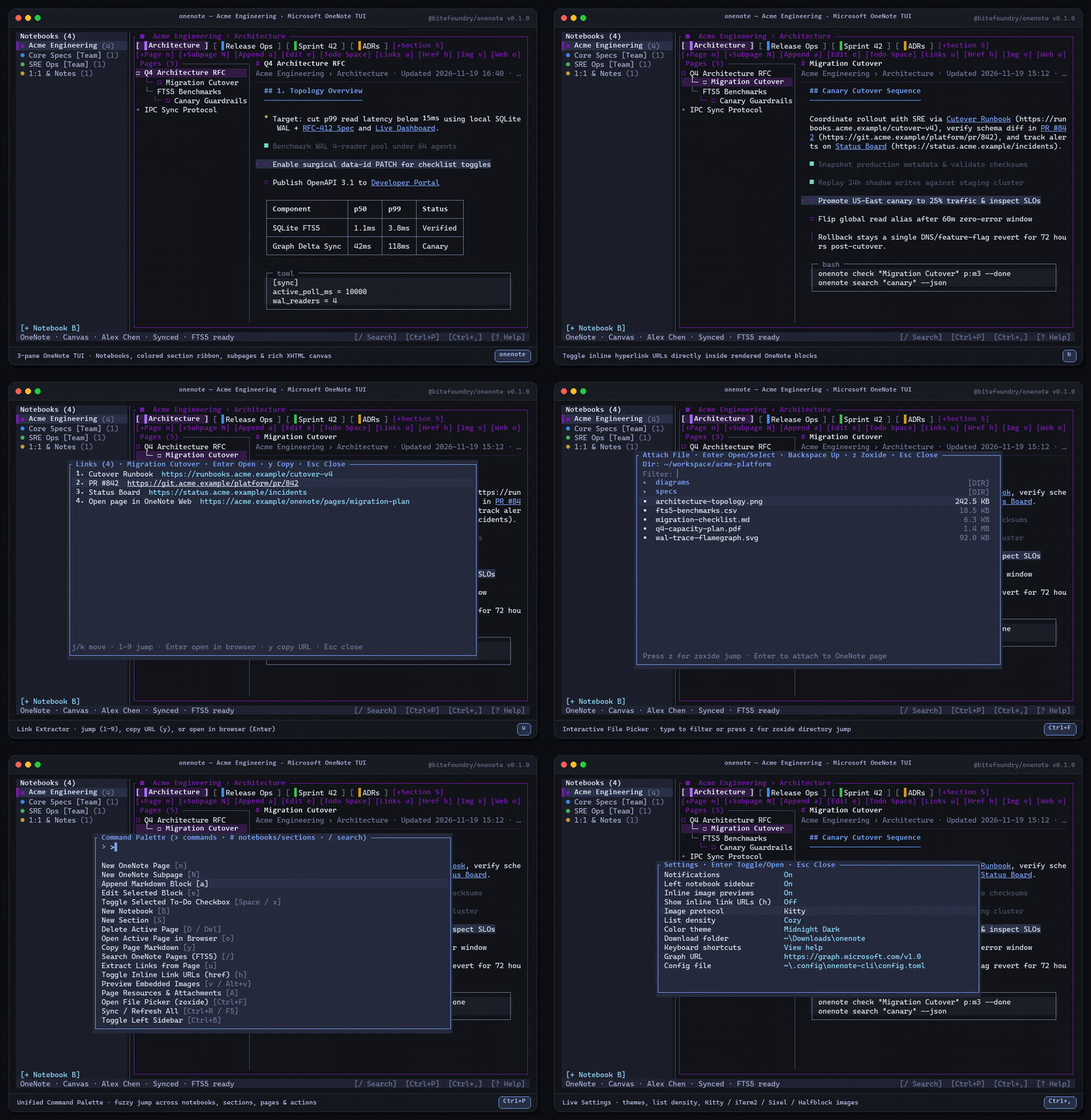
Key Capabilities
WYSIWYG Rendered In-Place Editor
Toggle seamlessly between Rendered, Live, and Source modes with Ctrl+M, with 0ms optimistic local writes synced to Microsoft Graph.
Scoped data-id Patching for AI Agents
Edit individual paragraphs, tables, or checklist items by data-id over 18 MCP tools without overwriting an entire OneNote page.
Full Tables, Checklists & SVG/Markdown
Parses OneNote XHTML faithfully into clean terminal tables, interactive to-do checkboxes, and inline image/SVG previews.
Parallel Section Prefetch & FTS5 Cache
Background sync mirrors notebook hierarchy and page content into local SQLite WAL for instant keyboard navigation and offline search.
Quickstart & MCP Agent Setup
onenote                       # Launch interactive OneNote TUI + WYSIWYG editor
onenote auth login            # Authenticate via Microsoft Graph (OS keychain)
onenote search "roadmap" --json # Search cached notebooks & pages via SQLite FTS5
onenote mcp # Start 18-tool stdio MCP server for AI agents{
"mcpServers": {
"onenote": {
"command": "onenote",
"args": [
"mcp"
]
}
}
}
Representative MCP tools (io.github.BiteFoundry/onenote): list_notebooks, list_sections, list_pages, get_page, patch_page_element, search_pages.
BiteFoundry OneNote vs. Traditional Desktop / Web Client
| Dimension | BiteFoundry OneNote (Rust) | Electron / Browser Client |
|---|---|---|
| Terminal / SSH usability | Full Rust TUI + WYSIWYG editor | Desktop/web GUI only (no native Linux client) |
| Linux support | Native Linux x64/ARM64 binary | No official native OneNote Linux desktop app |
| AI agent editing | Scoped data-id PATCH via 18 MCP tools | Manual copy/paste or brittle full-page overwrites |
| Local search | SQLite FTS5 instant offline search | Cloud-only on web |
Frequently Asked Questions
Can I use Microsoft OneNote natively on Linux from the terminal?
Yes. @bitefoundry/onenote ships native Linux x64 and ARM64 binaries (alongside Windows and macOS) with full TUI browsing, WYSIWYG page editing, checklist toggling, and offline SQLite FTS5 search.
How do AI agents edit OneNote pages safely?
The built-in 18-tool MCP server (`onenote mcp`) exposes scoped element patching by OneNote data-id, so agents update only the targeted section or checklist item instead of clobbering surrounding content.
Does it support OneNote tables and Markdown?
Yes. It renders OneNote XHTML tables, checklists, headings, and embedded resources cleanly in the terminal and converts seamlessly for CLI/MCP workflows.