Notion in the Terminal — Block-Live WYSIWYG TUI, CLI & MCP Server
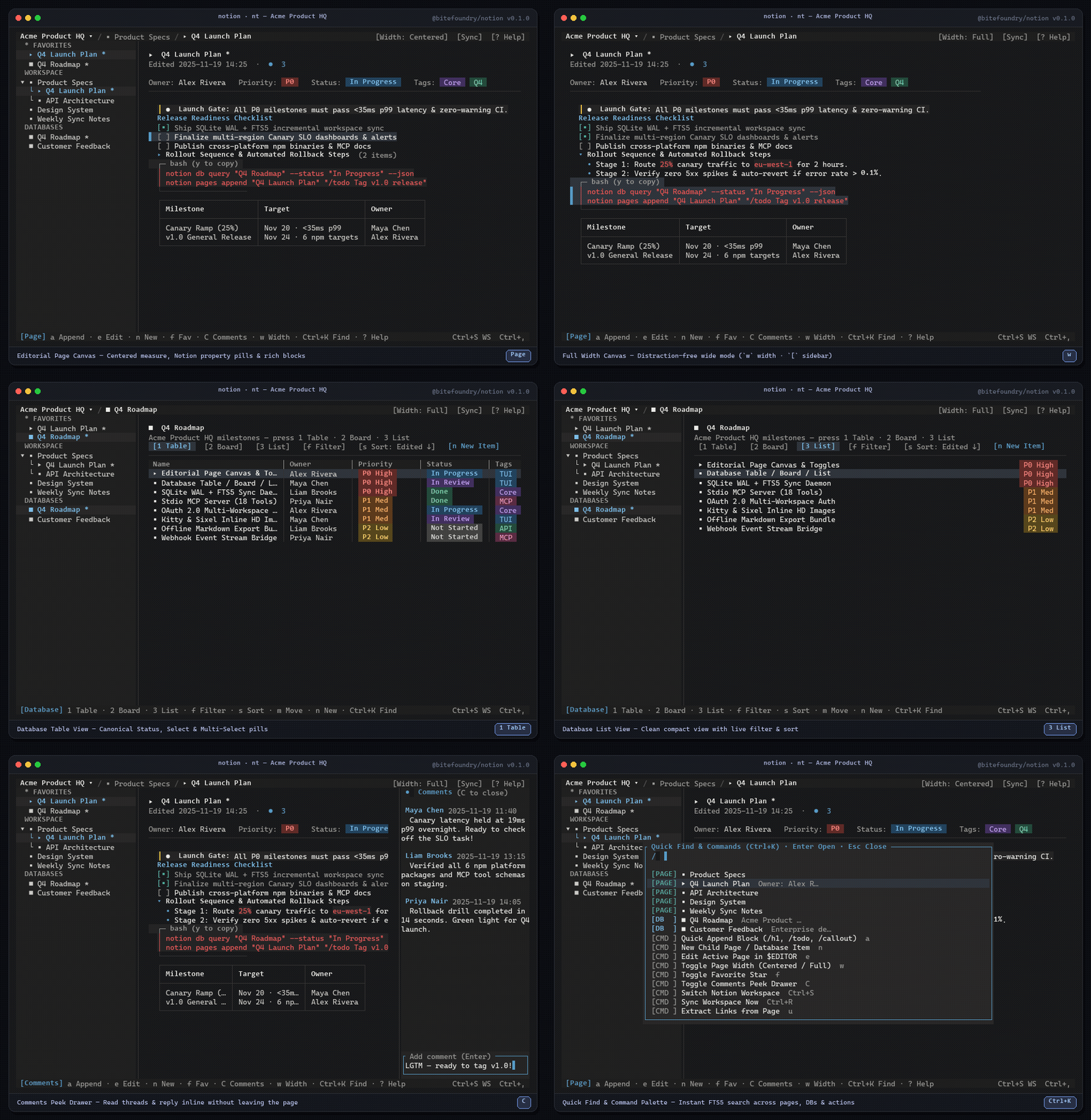
Read and edit Notion pages, nested block trees, comments, and Table/Board/List databases directly in your terminal with Block-Live WYSIWYG editing and 20 compact MCP tools.
$npm i -g @bitefoundry/notion
$brew install bitefoundry/tap/notion # or: curl -fsSL https://bitefoundry.dev/i | sh -s notion
Key Capabilities
Block-Live WYSIWYG Terminal Editing
Click or jump into any block, move across blocks with ↑/↓, split with Enter, use # / [] / > Markdown shortcuts, and toggle Source view with Ctrl+M.
Databases: Table, Board & List Views
Query, filter, and inspect Notion databases across Table, Kanban Board, and List layouts with Centered ↔ Full width wrapping.
20 MCP Tools with Selective Reads
Connect Claude Code, Codex, Cursor, or OpenCode to read blocks, query databases, and update specific pages using selective `fields:[...]` projection.
Streaming Block-Tree Sync & Multi-Workspace
Mirrors nested Notion block trees into local SQLite WAL for sub-millisecond search and offline browsing across multiple workspaces.
Quickstart & MCP Agent Setup
notion                        # Launch interactive Notion TUI + Block-Live editor
notion auth login             # Connect Notion workspace (multi-workspace supported)
notion search "PRD" --json    # Instant local SQLite FTS5 search across pages
notion mcp # Start 20-tool stdio MCP server for AI agents{
"mcpServers": {
"notion": {
"command": "notion",
"args": [
"mcp"
]
}
}
}
Representative MCP tools (io.github.BiteFoundry/notion): search_pages, get_page, create_page, update_block, query_database, list_workspaces.
BiteFoundry Notion vs. Traditional Desktop / Web Client
| Dimension | BiteFoundry Notion (Rust) | Electron / Browser Client |
|---|---|---|
| Performance & RAM | Native Rust binary, instant keyboard navigation | Heavy Electron/web app with lag on deep pages |
| Editing model | Block-Live WYSIWYG + Source toggle in terminal | Browser-only editor |
| AI Agent integration | Built-in 20-tool stdio MCP + --json CLI | Requires separate API wrappers or hosted connectors |
| Offline search | Local SQLite FTS5 full-text search | Limited offline support |
Frequently Asked Questions
Can I edit Notion pages and databases from the terminal?
Yes. @bitefoundry/notion includes a Notion-native Block-Live WYSIWYG terminal editor for pages and blocks, plus Table, Board, and List views for Notion databases.
How do I connect Notion to Claude Code or Cursor using MCP?
Install `npm i -g @bitefoundry/notion`, authenticate once, and register `{ "command": "notion", "args": ["mcp"] }` to expose 20 local-cache-accelerated MCP tools.
Does it support multiple Notion workspaces?
Yes. You can switch between multiple authenticated workspaces via the TUI, CLI flags, or `list_workspaces` MCP tool.